
**Update!** The artifact work within this article is now available within iLEAPP as well, available here. Thanks to all on the LEAPPs team for the review and approval of these artifacts!
When working on an investigation where images and videos are vital it is critical you look further into these files, their metadata, and their EXIF data. Additional information like the capturing device make, model, and operating system can be critical details in tying the media to a device. But what do you do if the current device information does not match the media’s data? It is certainly possible the media was captured on another device entirely but say the make and model match but not the operating system? What is your next step to connect that media to the examined device?
A while back I was given this premise, and the understanding that a Full File System (FFS) Extraction of an iPhone was obtained. In that case, there were numerous images and videos of abuse which – by review of the metadata and EXIF data – matched the make and model of the device in evidence, the location matched the residence, the timestamps fit the timeline… But the iOS version was not the same. In this case, it was crucial to prove beyond a reasonable doubt the device used to capture these images and videos was the device of the accused. Where did we look? The answer lay with the restore.log file, located at \private\var\mobile\MobileSoftwareUpdate\ within a FFS Extraction. Within the log we could see the current iOS version, the prior iOS version, the timestamp the update was completed, and some other useful information. Researching the release date of the former iOS version gave a date before the capture of these images and videos as well. Beyond capturing the device’s serial number (which is not captured in the EXIF data) we had reached our burden.
Then, I was presented with the same basic premise: an image significant to the case and the need to attempt to identify the capturing device. Fun change here? The make and model identified in the EXIF data differed from the device extracted and returned to the owner… In addition to the obvious changes in make and model, the extraction of the device was an Advanced Logical Extraction – not a FFS Extraction. So, what information is contained within an Advanced Logical Extraction that provides insight on other devices the user possesses? Thinking on some of my research which linked user activity to the devices recording the data led me to my first thought: ol’ reliable – better known as the healthdb_secure.sqlite database. Within one of my earliest articles on the healthdb_secure.sqlite database I covered the significance of differentiating origin products for commonly overlapped data types, like steps taken and distance traveled. Could this database hold the information I was seeking?
In this article, we will explore both the healthdb_secure.sqlite and healthdb.sqlite databases for data indicating devices possessed by the user, review device information hand-in-hand with OS version and timeframes of use, and look at information pointing to the current device model and OS version. The SQL Queries developed through this work were further developed into iLEAPP Artifacts and Magnet AXIOM Artifacts.
All SQL queries and artifacts are available for free usage here.
Note: except for the current device usage covered last – all artifacts work with iOS 15, 16, 17, and 18.
Software Used:
DB Browser for SQLite Version 3.12.2
Magnet AXIOM Process / Examine Version 8.8.0.42722
The Database:
Within the healthdb_secure.sqlite database, our device information comes from the data_provenances table. The table has 16 columns (with iOS 18) but for our work here we are only concerned with three:
- origin_product_type which identifies the device ID
- source_id which is useful in pointing to the same device usage as serial numbers or other exact device information are not contained within this database. Note: it is possible for a device recorded within this table to have matching model and OS version data while possessing differing source_id values. Based on current research, it cannot be determined whether multiple source_id values for matching model and OS version values reflects the same device recorded twice, with two or more source_id values, or multiple devices with the same model and OS values used by the same user and Apple ID.
- source_version which identifies the iOS or WatchOS version
Using a SQL query selecting these three columns from the data_provenances table will likely provide many results, some of which containing information within the source_version which does not match currently released iOS and WatchOS versions. We will use a WHERE clause and GROUP BY statement to assist in the usefulness of our query:
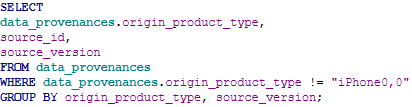
Here is a partial example of some results from this query:
| origin_product_type | source_id | source_version |
| iPhone7,2 | 3 | 10.0.1 |
| iPhone7,2 | 3 | 10.0.2 |
| iPhone7,2 | 3 | 10.1.1 |
| iPhone7,2 | 3 | 10.2 |
| iPhone7,2 | 3 | 10.2.1 |
From this data, we can see our iPhone7,2 was progressively updated from 10.0.1 to 10.2.1 and these iOS versions originate from the same iPhone, as the source_id does not change.
To make the query more end-user friendly and obtain left and right limits for these iOS versions, we can join the objects table and add MIN and MAX datetimes off the objects table’s creation_date column. Now our query looks like this:
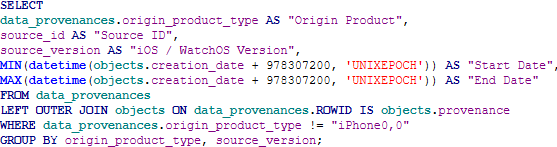
And our results are now:
| Origin Product | Source ID | iOS / WatchOS Version | Start Date | End Date |
| iPhone7,2 | 3 | 10.0.1 | 2016-09-17 01:37:14 | 2016-10-06 20:39:58 |
| iPhone7,2 | 3 | 10.0.2 | 2016-10-06 21:17:04 | 2016-11-05 00:47:01 |
| iPhone7,2 | 3 | 10.1.1 | 2016-11-05 03:25:22 | 2017-01-11 23:12:55 |
| iPhone7,2 | 3 | 10.2 | 2017-01-12 00:58:10 | 2017-03-05 04:27:11 |
| iPhone7,2 | 3 | 10.2.1 | 2017-03-05 05:25:16 | 2017-05-19 22:29:39 |
Here, we can see the timeframes for each iOS version of this device. The only potentially unclear information for the end user is the iPhone model, “iPhone7,2” could easily be interpreted as an iPhone 7 but that is not the case. So, we will add a case statement to the query to assist our end user in device identification. Note, the entirety of the case statement will not be shown – currently the number of Apple iPhones and Apple Watch models available is captured within a case statement which is 109 lines long.
| Origin Product Common Name | Origin Product | Source ID | iOS / WatchOS Version | Start Date | End Date |
| iPhone 6 | iPhone7,2 | 3 | 10.0.1 | 2016-09-17 01:37:14 | 2016-10-06 20:39:58 |
| iPhone 6 | iPhone7,2 | 3 | 10.0.2 | 2016-10-06 21:17:04 | 2016-11-05 00:47:01 |
| iPhone 6 | iPhone7,2 | 3 | 10.1.1 | 2016-11-05 03:25:22 | 2017-01-11 23:12:55 |
| iPhone 6 | iPhone7,2 | 3 | 10.2 | 2017-01-12 00:58:10 | 2017-03-05 04:27:11 |
| iPhone 6 | iPhone7,2 | 3 | 10.2.1 | 2017-03-05 05:25:16 | 2017-05-19 22:29:39 |
Our “iPhone7,2” is an iPhone 6.
Also not shown in this article, though available in the query linked location, is the substantial WHERE clause which isolates only released iOS / WatchOS versions within our source_id column. This greatly reduces the number of false positive hits where the data_provencances table records data for an iPhone but reflects the WatchOS of the connected Apple Watch. All in all, the segment of the WHERE clause identifying values in the source_version column that corresponds to Apple models and the OS versions possible is some 323 lines of query. It’s intense but hey, we did it so you don’t have to.
Data Revisited:
Let’s think back to our first FFS Extraction example. Numerous images and videos of abuse where the EXIF data matched the device in evidence – just not the current iOS version. Running the query not only revealed the timeframe of the earlier iOS version, but every single iOS installed, their timeframes, and every device associated with the Apple ID.
What about the Advanced Logical Extraction containing our image where the EXIF data did not match the make and model of the device in evidence? Running this query revealed that both the extracted device and the make and model of the device in our EXIF data were active when the image was captured; however, three months prior to speaking with law enforcement the user switched to another iPhone.
Let’s Look Further…
So, we now have a timeline of every model device and timeframes of their OS version. What if we just want a list of devices and the overall timeframe of usage? Our query just needs minor tweaking and removing the OS version from the equation. Note, the below image does not include the 194-line case statement matching all currently released Apple iPhones, Apple Watches, and Apple iPads against their device IDs.

And our results:
| Origin Product Common Name | Origin Product | Start Date | End Date |
| iPhone 6 | iPhone7,2 | 2016-09-17 01:37:14 | 2018-04-27 15:37:56 |
| iPhone 8 | iPhone10,1 | 2018-04-27 18:53:52 | 2023-04-29 17:35:03 |
| Watch Series 3, 42 mm | Watch3,4 | 2021-05-26 21:39:54 | 2024-06-14 23:50:03 |
| iPhone SE (2nd generation) | iPhone12,8 | 2023-04-29 20:22:08 | 2025-01-27 16:35:22 |
| Watch Series 9, 41 mm | Watch7,1 | 2024-03-14 07:48:48 | 2025-01-27 18:19:42 |
Now, we can see all Apple devices, their device IDs as recorded by the database, and their timeframe of use.
Finally, we shift databases – but only slightly. Looking at the healthdb.sqlite database we can parse the devices currently in use by the user (only with iOS 18.0 and newer).
Our table of focus is the device_context table within the healthdb.sqlite database. Columns of note include product_type_name (our device ID), currentOS_name, currentOS_version, and date_modified. Without our 194-line case statement, our query is as follows:

Our output for this dataset:
| Origin Product (Common Name) | Origin Product | OS Version | Date Modified |
| iPhone SE (2nd generation) | iPhone12,8 | iOS 18.2 | 2025-01-27 17:45:02 |
| Watch Series 9, 41 mm | Watch7,1 | watchOS 11.2 | 2025-01-27 16:35:29 |
Direct comparison between these results and our last results shows that the iPhone 6, iPhone 8 and Watch Series 3, 42 mm are no longer used by the user. The iPhone SE (2nd generation) and Watch Series 9, 41 mm are still used.
Conclusion:
Within this article, we explored both the healthdb_secure.sqlite and healthdb.sqlite databases for data revealing device usage, OS versions and timeframes, as well as real-world examples of how this data can be leveraged in cases today. The SQL Queries developed through this work, while a bit complex, are freely available for use through SQLite database viewers such as DB Browser, iLEAPP, and Magnet AXIOM Process / Examine, available here.


 The Metadata Perspective
Leave a reply to Week 05 – 2025 – This Week In 4n6 Cancel reply