
Reviewing Apple Watch Sleep App in Anticipation of the Vitals App
How’s your sleep been lately? Currently, there are numerous sleep tracking and monitoring devices available to track, monitor, and quantify sleep patterns for users actively seeking to improve their sleep or just casually review sleep periods. For Apple users who also own an Apple Watch the solution may be on your wrist already. Sleep tracking, as recorded natively through the Apple Watch and the Sleep app, has been available since watchOS 8 and categorized since watchOS 9. This article will review the Sleep app through a digital forensic viewpoint with potential insight into the upcoming Vitals app.
Caveat: Ultimately, this article is in the framework of Digital Forensics, an area of expertise for the author. The focus of this work is not somnology, the scientific study of sleep, although this will reference outside works which delve deeper into sleep study and sleep states.
The DFIR Limitation of the Sleep App
Currently, the biggest limitation of the Sleep app is that sleep tracking is not set by default – the user has to create sleep schedules to start tracking sleep, and to start creating and storing data. The user can set up or change sleep options either through the Apple Watch Sleep app or through Apple iPhone’s Health, Watch, and Settings applications. There are numerous options available for total customization of sleep schedules ranging from the bare minimum set sleep period to a full combination of wind down periods with sleep reminders, sleep focus (silencing notifications from people and / or apps), alarms based on the sleep schedule, and sleep results (notifications when you meet or exceed your sleep goal).
Sleep Stages – Available Since watchOS 9
While the option to monitor sleep was present before watchOS 9, this is the update where sleep stages, or categorizations, were supported. These stages are Awake, REM, Core, and Deep. The Apple Health application, when viewing Sleep data, defines these stages as follows:
Awake: “It takes time to fall asleep and we wake up periodically throughout the night. This time is represented as ‘Awake’ in your charts.” 1
REM: “Studies show that REM sleep may play a key role in memory and refreshing your brain. It’s where most of your dreaming happens. Your eyes will also move side to side. REM Sleep first occurs about 90 minutes after falling asleep.” 1
Core: “This stage, where muscle activity lowers and body temperature drops, represents the bulk of your time asleep. While it’s sometimes referred to as light sleep, it’s just as critical as any other sleep stage.” 1
Deep: “Also known as slow wave sleep, this stage allows the body to repair itself and release essential hormones. It happens in longer periods during the first half of the night. It’s often difficult to wake up from deep sleep because you’re so relaxed.” 1
Visually, an example of these data stages is as follows, as displayed through the Health application:
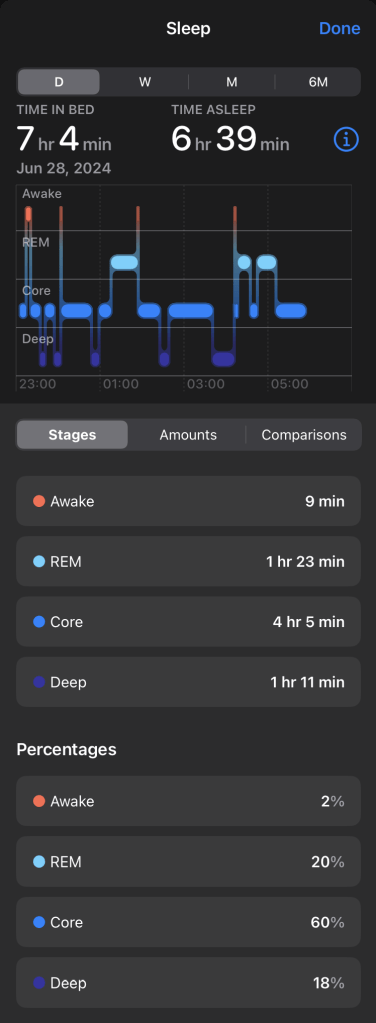
Apple’s breakdown of these sleep stages can be very informative for the user, those interested in their quality of sleep. Brandon Ballinger lays out the science behind these stages, provides an insight into how the Apple Watch measures these stages, gives a look into “normal” percentage amounts of each stage, and states potential causes for below average sleep – available here. 2 Ballinger, in his work, identifies that these sleep stages are based on the sleep cycle, ordering them to follow the cycle in a Core – Deep – REM pattern, repeating throughout the night.
Here, for the Digital Forensic component, the big questions are where and how this data is stored and how to parse the data into a readable format.
Another Trip into the healthdb_secure.sqlite Database
If you are familiar with this database, or my last article on Watch Worn Data Analysis, you likely guess our first look is in the “samples” table, and you would be correct! But like all things Apple, it cannot be that simple. My initial thought was that we would data_id values, a start date, an end date, and then a data_type value unique to “Asleep”, “REM”, “Core”, and “Deep”. Instead, we have 63.
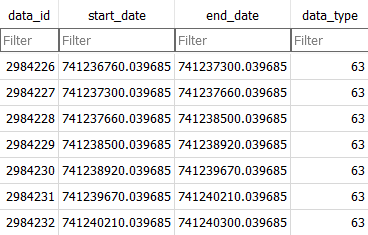
And just 63 for the entire sleep period. My initial thought then was that the answer would lie within the metadata_values table, citing metadata_keys table key values – such as that used within Workouts (one object_id value tying together a myriad of data including, but not limited to: timezone, min heart rate, max heart rate, latitude, longitude, temperature, humidity, min elevation, max elevation, etc.). But again, that was incorrect. After some additional database review and comparison to known data recorded through the Apple Watch and iPhone, it was found the answer was within the category_samples table.
Review of the category_samples Table
The category_samples table is composed of just two columns: data_id and value. The data_id identifier is joined to the samples table data_id column (samples.data_id = category_samples.data_id). Looking at the category_samples.data_id values data previously reviewed within the samples table, we can see the following:
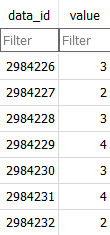
The samples table provides data_type 63 data indicating these rows are related to sleep as well as starting and ending timestamps for the sleep stages. Values 2, 3, 4, and 5 (5 not shown above) provide our sleep state identifiers. Direct comparison to our June 28 Sleep period identified that:
2 is “Awake”
3 is “Core”
4 is “Deep”
5 is “REM”
Some SQL Querying within DB Browser for SQLite (Version 3.12.2) displays the following result:
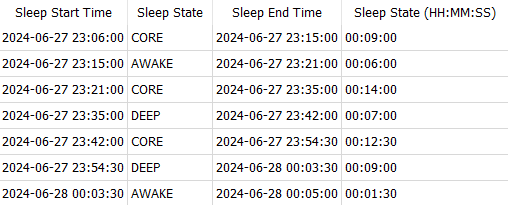
Further SQL Querying, leveraging time and sleep state values against the entirety of the sleep period, displays the following result:

From some six columns of two tables (samples: data_id, start_date, end_date, and data_type; category_samples: data_id and value) we can generate valuable data points, providing context to the sleep of the individual.
Note: Because the SQL queries are a bit involved, I will not be covering all aspects of the queries or how they function, but they will be submitted to iLEAPP and available on our company Github. Comparison of this data to our Health application image above, displaying Sleep data for this time period, does differ slightly. Actual values within the database for sleep states were rounded to thirty seconds. Additional research and data review may shed more light on the factoring of provided data, such as “Time in Bed.” Our “Time in Bed” is the amount of time from the start to the end of the sleep period.
The “So What” of Sleep Data
Wearable devices, such as the Apple Watch, have proven critical in numerous investigations. Whether using heart rate date to determine likely time of death or movement in general to align to an alibi or compare against criminal activity, the caveat has been that the user must have been wearing the device. This data must carefully be reviewed and analyzed but heart rate, steps taken, distance traveled, flights climbed, stand up events, and other data points can be used to create baselines for comparison in light of an offense, or offenses, under investigation. Sleep data, currently, requires an additional step of setting sleep periods. Currently.
The current, at the time of this article, is watchOS 10.5. Reportedly, watchOS 11 will be released in September 2024 which will bring with it the release of the Vitals application. Sleep will be a critical component of the Vitals application “at a glance” metric review of sleep, heart rate, respiratory rate, wrist temperature, and blood oxygen data.3 It appears, and time will tell for sure, that Sleep data may be automatically recorded through the Vitals application – potentially removing the need to set sleep periods. This would have a direct impact on Health application data for criminal investigations as then the only barrier for data would be the user wearing the device (and battery level). Increased recording of user data, at a glance, for periods of activity during the night would have far greater impact for at-home sleep driven alibis as well as during-the-night sexual assault allegations.
Conclusion:
The Apple Watch Sleep app offers valuable insights into sleep patterns through its categorization of sleep stages and detailed tracking capabilities. However, it currently requires manual setup by users to begin recording data, which can be a limitation in certain contexts, such as forensic investigations. Despite some challenges in data parsing from the healthdb_secure.sqlite database, the information stored within can be instrumental in forensic analysis. The anticipated release of the Vitals app with watchOS 11 potentially makes automatic sleep data recording a reality. This enhancement could significantly impact the use of sleep data in forensic contexts by providing more readily available and consistent data. As wearable technology continues to evolve, its applications in both personal health monitoring and forensic investigations are likely to expand, offering more detailed and accessible data to users and professionals alike.
Continue following us for additional research and work like this – soon to include additional analysis on other wearable technologies as well!
References:
- Apple Inc. (2024) Health (iOS 17.5.1) [Mobile app]. https://www.apple.com/ios/health/
- Ballinger, Brandon. “The Average Apple Watch User Gets 49 Minutes of Deep Sleep per Night.” The Average Apple Watch User Gets 49 Minutes of Deep Sleep per Night, Empirical Health, 25 Feb. 2023, data.empirical.health/p/apple-watch-deep-sleep-meaning.
- “Watchos 11 Brings Powerful Health and Fitness Insights.” Apple Newsroom, 28 June 2024, http://www.apple.com/newsroom/2024/06/watchos-11-brings-powerful-health-and-fitness-insights/.


 The Metadata Perspective
Leave a comment